Key takeaways
- Meta says allowing Meta-WebIndexer helps it cite and link your content in Meta AI responses. Blocking it removes that path, so a visibility cost is plausible, but nobody has published a measured number.
- Promptwatch Data shows Meta-WebIndexer grew from about 2.2% of tracked AI crawler requests in mid-July 2026 to 37.8% on Aug 9, 2026.
- Blocking Meta's training crawler (meta-externalagent) is a different decision from blocking its indexing crawler. Treat them separately.
- robots.txt is only one layer. A CDN or WAF rule can block a bot even when robots.txt says allow, so test with real requests.
- A clean test needs a baseline, one change, a fixed prompt set, and enough weeks to see the crawler come back.
The short answer
Probably yes, blocking Meta-WebIndexer hurts your chance of being cited in Meta AI. But "probably" is doing real work in that sentence.
The logic is simple. Meta-WebIndexer is the crawler Meta describes as improving Meta AI search results. Meta's own wording, repeated by several third-party write-ups, is that allowing it "helps us cite and link to your content in Meta AI's responses." If the bot can't fetch your pages, it can't index them, and a page that isn't indexed is hard to cite. I haven't re-verified that wording against Meta's developer documentation, so read it there before you make a policy decision.
What is missing is evidence of the size of the effect. Promptwatch Data's report on Meta's crawling measures crawl volume, not Meta AI citations. It doesn't show that blocking changes visibility. That inference is reasonable, but it is still an inference. Which is exactly why a test is worth running.
Why this question suddenly matters
For a long time Meta's crawlers were an afterthought for most SEO teams. That changed fast.
According to Promptwatch Data (report published Aug 10, 2026), Meta-WebIndexer made up about 2.2% of the AI crawler requests Promptwatch tracks in mid-July 2026. By Aug 9 it was 37.8%. That is roughly 17x in under a month, from about 1 in 50 requests to more than 1 in 3, which made it the heaviest AI crawler in the logs.
The timeline in the report:
- The share stayed around 2% until July 17.
- It spiked to about 23% between July 20 and 22.
- It passed 26% around Aug 6 and climbed steadily to the Aug 9 peak.
A few caveats on the measurement, because they matter. The number is meta-webindexer requests divided by requests from all AI crawlers Promptwatch tracks. It is not a share of total site traffic. Meta's other bots (meta-externalagent, meta-externalfetcher, FacebookBot) are left out of the numerator but counted in the denominator. Googlebot, Bingbot, FacebookExternalHit and humans are excluded entirely. The report also says the surge comes from the indexing crawler specifically, not Meta's training or link-fetching bots.
There is also a rumor floating around. On Aug 6, 2026, @levelsio posted that Meta staff had allegedly told him Meta is building its own web index so its AI doesn't have to search through Google, and he reported heavy scraping that triggered server load alerts. That is unconfirmed. I'd treat it as a signal worth watching, not a fact.
Other relevant data: for a broader view of how AI search behavior shifts month to month, the Promptwatch Data hub tracks crawler and citation changes across the major engines.
Meta's crawlers are not one bot
Most confusion on this topic comes from lumping everything Meta runs into a single decision. They do different jobs.
| User agent | What it does | If you block it |
|---|---|---|
| meta-webindexer | Indexes pages for Meta AI search results | Meta AI likely stops citing and linking to you |
| meta-externalagent | Crawling associated with AI training and indexing | Keeps content out of training use, per most guides |
| meta-externalfetcher | Fetches pages on behalf of users | Link fetches in Meta products can fail |
| FacebookBot | Meta's general-purpose crawler | Depends on your setup |
| FacebookExternalHit | Link previews when someone shares your URL | Broken previews on Facebook, Instagram, Messenger |
The practical split: if your concern is training, you target the training crawler. If your concern is being cited in Meta AI, you leave the indexing crawler alone. Several robots.txt guides make the same point about the wider AI ecosystem: blocking training bots such as GPTBot, ClaudeBot, meta-externalagent and CCBot keeps content out of future training without touching visibility in AI search, because search runs on different bots.
One warning from the checker tools I looked at: agents with names ending in "User" are not crawlers in the training sense. They fetch a page because a person asked about it. Blocking them protects nothing from training. It only stops the person trying to read your page.
What blocking actually costs you
Before deciding, list what you'd lose.
- Meta AI answers. Remove meta-webindexer and you remove the path Meta says it uses to cite and link your pages.
- Link previews, if you block the wrong bot. FacebookExternalHit is the one that matters here, and people sometimes break it by blocking everything with "meta" in the name.
- Possibly ad landing pages, if you run Meta ads and your landing page checks get tangled up in the same rules. Worth confirming in your own setup.
What you probably do not lose is Google rankings. AI crawler blocks have nothing to do with Googlebot, and blocking GPTBot, ClaudeBot or Meta's bots does not change your position in classic search.
When does blocking make sense anyway? If your server bills per request and Meta's crawl volume is hurting you, that's a real reason. So is a strict content-licensing stance. If your pages exist to win buyers, though, presence in AI tools is usually worth more than abstract control. Honestly, for most commercial sites I'd lean toward allowing it and rate limiting if load becomes a problem.
Step 1: Find out whether Meta-WebIndexer even visits you
The first mistake is to debate policy before looking at your logs. Check whether the bot shows up at all.
Search your server or CDN logs for these user agents:
meta-webindexer
meta-externalagent
meta-externalfetcher
FacebookBot
A quick command-line version against an access log:
grep -i "meta-webindexer" access.log | awk '{print $9}' | sort | uniq -c
That gives you a count of response codes. If you see mostly 200s, the bot is getting in. If you see 403s or 429s, something is already turning it away, whatever your robots.txt says. Also note user agents can be spoofed, so verify against published IP ranges where Meta provides them before drawing conclusions.
If you don't want to parse logs by hand, Promptwatch offers IP-verified AI crawler logs that show which pages each bot read, what errors it hit, and filter out spoofed requests. Promptwatch's own report recommends exactly this first step: check logs and robots.txt for all four Meta user agents.

Step 2: Check every layer that can block it
robots.txt is the layer people remember. It is rarely the only one.
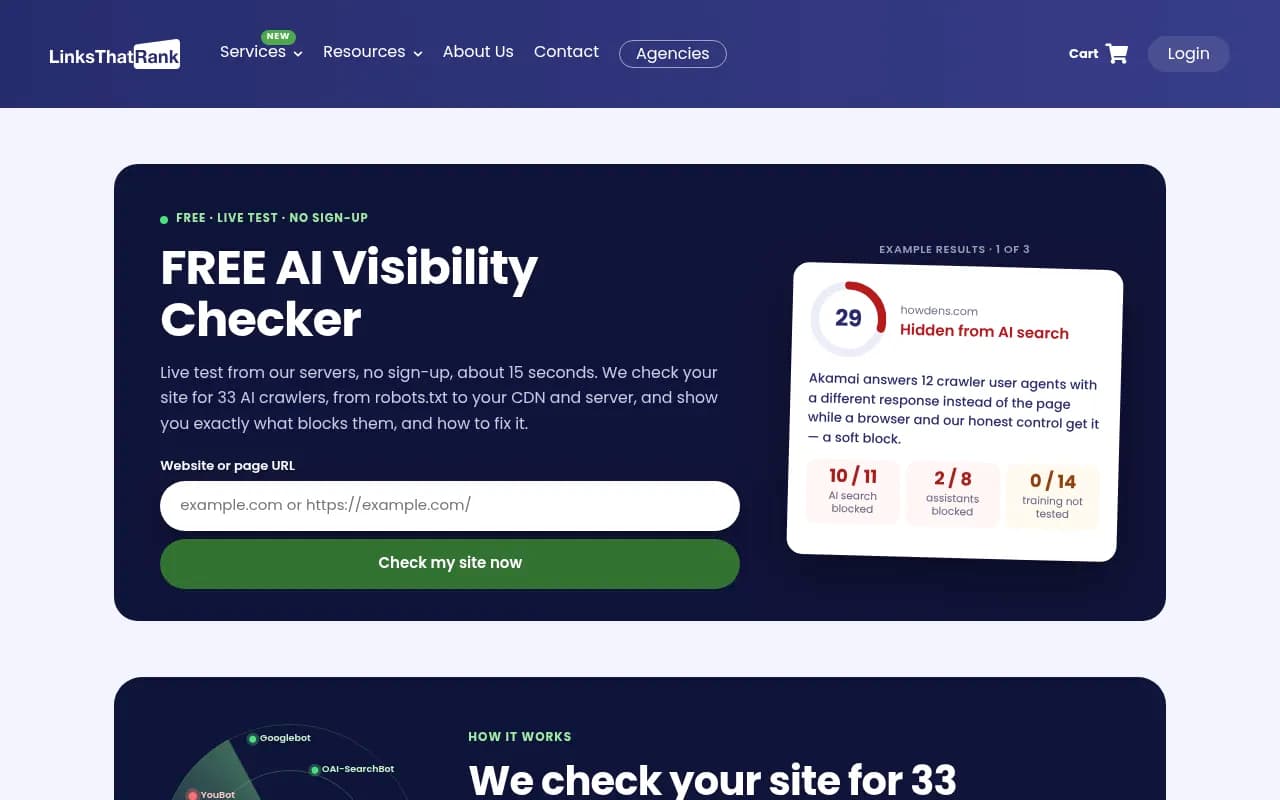
The free checker above makes this point well. A robots.txt file can say Allow while the crawler actually receives a 403 from the CDN. A robots.txt-only checker will tell you everything is fine, and the crawler is still locked out. One example result on that page describes a CDN answering a dozen crawler user agents with a different response than the page, while a normal browser got the real thing. That's a soft block, and it's invisible if you only read robots.txt.
Layers to inspect:
- robots.txt. Look for broad rules like
User-agent: *withDisallow: /, and any Meta-specific groups. - CDN and WAF rules. Cloudflare, Akamai, Fastly and similar services often ship bot-management defaults that challenge unfamiliar crawlers.
- Server config and rate limiting. Nginx or Apache rules, fail2ban, and hosting-level protections.
- Authentication and geo rules. Less common, but they catch people out.
If you want to allow the indexer while blocking the training crawler, the most specific matching rule wins, so you can do this:
User-agent: meta-externalagent
Disallow: /

User-agent: meta-webindexer
Allow: /
After changing anything, re-test. As one checker notes, a CDN rule can override whatever robots.txt asks.
The tools below can test crawler access from outside your network:
| Approach | Catches robots.txt rules | Catches CDN or WAF blocks | Cost |
|---|---|---|---|
| Reading robots.txt by eye | Yes | No | Free |
| robots.txt-only validators | Yes | No | Free |
| Live crawler access checkers | Yes | Yes | Usually free |
| Your own server or CDN logs | Indirectly | Yes | Free to low |
| IP-verified crawler log platforms | Yes | Yes | Paid |
For deeper technical crawl analysis on large sites, enterprise tools like Botify are built around log-file work.
Step 3: Build a baseline before you change anything
This is where most people skip ahead and ruin the experiment. If you flip the setting first, you have nothing to compare against.
Capture these for two to four weeks before any change:
- Meta-WebIndexer request counts per day and which URLs it hits
- Response codes it receives
- Your visibility in Meta AI for a fixed set of prompts
- Referral traffic from Meta properties, if you can segment it
For the prompt set, pick 20 to 50 questions where your brand or pages should plausibly show up. Mix branded, category and comparison queries. Write them down and don't change them mid-test. Run them on a schedule, say weekly, and record whether Meta AI mentions your brand, cites your domain, or links to a specific page.
Be honest about the limit here. Meta AI is harder to monitor at scale than ChatGPT or Perplexity, and I could not find an established tracker with strong Meta AI coverage, so some of this will be manual. If you track multiple AI engines at once, a platform that records answers and citations over time makes the comparison less painful. Options in the catalog include:



Check each tool's supported-model list before you buy, since coverage of Meta AI specifically varies and changes often.
Step 4: Run the test properly
There are two sensible designs.
Option A: Block, then unblock
If you currently allow the bot, block it for a few weeks, watch what happens, then restore access. The risk is obvious: you may lose citations you'd have earned. Only do this on a site where a short dip is acceptable.
Option B: Unblock, then compare
If you currently block the bot (maybe by accident, which is common), allow it and compare against your baseline. This is the safer direction. You aren't giving up anything, and a mistaken block is usually the more realistic situation.
A third, cleaner option is a split by section. Allow Meta-WebIndexer on one directory and keep it blocked on a comparable directory, then compare citation rates. It's imperfect, but it controls for time-based noise like model updates.
Rules for either design:
- Change one thing. Don't edit robots.txt, your CDN settings and your content at once.
- Verify the change worked by requesting your pages with the bot's user agent and checking the status code, not by trusting the config file.
- Wait for recrawl. Indexing is not instant. Give it several weeks, and confirm in your logs that the bot actually came back and received 200s.
- Keep the prompt set fixed and run it on the same cadence throughout.
- Note external events. Model updates and policy changes can swamp your signal.
Given how fast the crawl volume changed in July and August 2026, expect the bot's behavior itself to drift during your test. Another reason to log everything.
Step 5: Read the results without fooling yourself
If Meta AI starts citing your pages after you unblock, and your logs show the crawler fetching successfully first, you have decent evidence of cause. If nothing changes, that doesn't prove the block was harmless. Meta AI may not use your content for the prompts you chose, or your pages may not be strong enough to cite.
Some questions to ask:
- Did the crawler actually return after the change, and did it get 200s?
- Did citations appear for pages it crawled, or for pages it never touched? The latter suggests another cause.
- Are other engines moving in the same direction? If everything rose, it's probably not Meta.
A note on expectations: for ChatGPT, Promptwatch Data shows that citation behavior is volatile and shifts with model rollouts. I'd assume Meta AI is at least as noisy while its index is still being built.
Allow, block or split? A decision guide
| Your situation | Suggested setup |
|---|---|
| Commercial site that wants AI visibility | Allow meta-webindexer, consider blocking meta-externalagent if training is a concern |
| Publisher with licensing concerns | Block training crawler, review indexer access case by case |
| Server costs spike from bot traffic | Allow but rate limit at the CDN instead of blocking outright |
| Private or gated content | Block everything and enforce it at the CDN |
| Not sure what visits you | Don't change anything yet. Read logs first |
Two mistakes to avoid. Don't block everything with "meta" in the name, since that can break link previews. And don't assume allowing the indexer means allowing training. They are different user agents with different rules.
Where to go from here
Crawler access is only the entry ticket. Once Meta-WebIndexer can reach your pages, whether Meta AI cites you depends on the same things that matter elsewhere: clear, useful content that answers the question directly. If you want to watch crawler activity and citations across several engines in one place, tools like Promptwatch can handle that, and the directory at bestgeosoftware.com lists alternatives worth comparing.
My honest read: Meta is clearly investing in crawling at scale, and the sensible default for sites that want to be found is to leave the indexing bot alone, block what you object to on training grounds, and verify at the CDN level that your rules do what you think. Then measure. Anyone claiming a precise number for the cost of blocking Meta-WebIndexer today is guessing, and your own logs will tell you more than any generic guide.