Key takeaways
- llms.txt is a cheap docs index for coding agents. It is not an AI search visibility lever, and the data backs that up.
- MCP server cards are optional metadata that let agents and IDEs discover your MCP server. The spec status is Final, but the file location is still confusing, so check the extension repo before you ship.
- Markdown endpoints belong on developer docs, not on marketing pages. HTML takes 99.94% of AI search citations.
- Agent readiness is a docs quality problem first: server-rendered pages, no login walls, working links, and crawlers you have not accidentally blocked.
- Measure with crawler logs and citation tracking, not with a checklist score.
Why dev tool marketers should care
Your buyer used to be a human reading your docs. Now it is often a coding agent reading them on behalf of a human, then writing the integration code. If the agent cannot find your docs, parse them, or call your API, the developer picks whatever the agent can use instead. You never see that lost evaluation in your funnel.
There are two separate audiences here, and mixing them up is the most common mistake I see:
- AI search (ChatGPT, Perplexity, Google AI Overviews) deciding whether to recommend and cite you.
- Coding agents (Claude Code, Codex, Cursor, OpenCode) fetching your docs and calling your tools while someone builds.
llms.txt, markdown, MCP and agent skills mostly serve the second group. Classic content quality, crawlability and citations serve the first. The rest of this guide keeps them apart.
The agent-readiness stack at a glance
| Resource | What it does | Who reads it | Worth it for dev tools? |
|---|---|---|---|
| llms.txt | Curated reading list of doc links | Coding agents, some crawlers | Yes, cheap |
| llms-full.txt | All docs in one file | Coding agents | Optional |
| Markdown (.md) pages | Clean copy of each page | Coding agents | Yes, for docs only |
| robots.txt and bot rules | Controls which crawlers get in | Every crawler | Yes, check first |
| MCP server | Lets an agent search docs or call your API | MCP clients | Yes, if you have an API |
| MCP server card | Describes your server for discovery | Clients, registries, IDEs | Yes, once the server exists |
| AGENTS.md | Repo instructions for agents | Agents working in a repo | Yes, for open source repos |
| SKILL.md | Reusable task workflows | Agents with skills support | Yes, a few good ones |
llms.txt: useful, but be honest about what it does
The llms.txt proposal is a markdown file at your site root: an H1 title, a blockquote summary, and H2 sections with links to markdown versions of your pages. The current version of the spec also recommends rel="alternate" type="text/markdown" links on pages and rel="describedby" pointing back to the llms.txt file. Its own integration notes say it is used most heavily for software documentation, where coding agents follow it to API references and tutorials.
A minimal file looks like this:
# Acme API

> Payments API for marketplaces. REST, webhooks, SDKs for Node and Python.

## Docs

- [Quickstart](https://docs.acme.dev/quickstart.md): First payment in 10 minutes
- [Authentication](https://docs.acme.dev/auth.md): API keys and OAuth
- [Webhooks](https://docs.acme.dev/webhooks.md): Events and retries

## Optional

- [Changelog](https://docs.acme.dev/changelog.md)
Now the part vendors skip. Ahrefs looked at 137K sites and found that 97% of llms.txt files never receive a single request. Of the roughly 3% that did, only 10.5% of requests came from AI agents and agentic infrastructure like Claude Code, and 77% of the bots reading the file were not from AI tools at all. Training crawlers fetched it nearly five times more than AI retrieval bots. SE Ranking found no correlation between having llms.txt and getting AI citations. Ahrefs also quotes John Mueller saying it works best as reference material for AI coding agents.
My read: ship it because it takes an afternoon and your docs audience is exactly who it helps. Do not report it to your CMO as an AI search growth project. Fetched also does not mean read, so even those request numbers are ceilings.
Keep it small and accurate
- Link only to pages that return 200 and are real content, not HTML shells.
- Use hierarchical files for big docs sites. One giant root file can swamp a context window.
- Generate it from your docs build so it cannot drift. A stale llms.txt with 404 links is worse than none. The free LLMs.txt generator is fine for a first draft.
Markdown: put it on docs, not on the blog
Agents want clean markdown instead of rendered HTML. One third-party write-up cites a Cloudflare measurement of 31% fewer tokens and 66% faster responses when markdown is served instead of HTML. I could not verify that against Cloudflare directly, so treat it as directional. The Redocly team reports something more concrete for its docs MCP: a code mode, where the agent writes a short script to chain doc calls, used 86% fewer input tokens on average in their tests.
But do not extrapolate this to AI search. Promptwatch Data's Markdown in AI Search report (last 7 days of citations when published in February 2026, across ChatGPT, Claude, Perplexity and Google AI Overviews) found HTML took 99.94% of citations and markdown files took 0.05%. That is roughly 2,000 HTML citations for every markdown one. The same report shows heavy crawling of /docs/**.md paths by Claude's and OpenAI's bots, which is the pattern you would expect from coding agents.
So the rule is simple:
- Developer docs: serve
.mdfor every page, support content negotiation (Accept: text/markdown), and link the markdown from llms.txt. - Marketing and blog pages: do not bother with
.mdmirrors. Fix the HTML instead: heading hierarchy, semantic markup, direct answers near the top, and server-side rendering.
Bot access: the boring step that decides everything
Before any file format matters, check that the bots can get in. Documentation.AI's agent-readiness rubric ranks failures by severity, and the blocking ones are not subtle: no llms.txt, pages rendered only by JavaScript, and docs behind a login or bot challenge. Each means the agent gets nothing or no map of your site. High-severity problems include llms.txt links that 404 or point to HTML, and pages too long for a single fetch.
A practical check:
- Review robots.txt, CDN and WAF rules for each major AI provider. Bot challenges on docs subdomains are a frequent accidental block.
- Separate training crawlers from answer-time fetchers in your rules. You might allow one and not the other.
- Compare your logs with the market mix. In Promptwatch Data's AI crawler traffic report (IP-verified requests, June 8 to September 6, 2026), OpenAI accounted for 79.8% of verified AI crawler requests in the week of August 31 to September 6, down from 94.8% in the week of June 8. If a provider is large in that report and near zero in your logs, you are probably blocked.
The Promptwatch AI bots directory lists 400+ crawlers with robots.txt guidance, and the robots.txt generator for AI helps if you do not want to hand-write rules. Meta's crawler is worth a look too; Promptwatch's Meta-WebIndexer data shows it went from about 2% to nearly 38% of tracked AI crawler requests between mid-July and August 9, 2026.
MCP: from docs to actions
llms.txt gives an agent a list of pages to choose from. An MCP server gives it a search tool that returns the relevant passage, ranked by your own index, plus the ability to take actions in your product. The Model Context Protocol is now governed by the Agentic AI Foundation under the Linux Foundation, and the Python and TypeScript SDKs reportedly see around 97 million monthly downloads. I would not quote the "500 public servers" figure floating around some guides; it looks stale.
There are two kinds of MCP server a dev tool company might ship:
- A docs MCP server that exposes
searchandfetchtools over your documentation. Many docs platforms now generate one for you. Redocly projects get one at/mcp, and Documentation.AI sites get one at/_mcp. - A product MCP server that exposes real API operations to agents, with auth.
Start with the docs server. It is low risk, read-only and immediately useful for coding agents.
Production checklist for a product MCP server
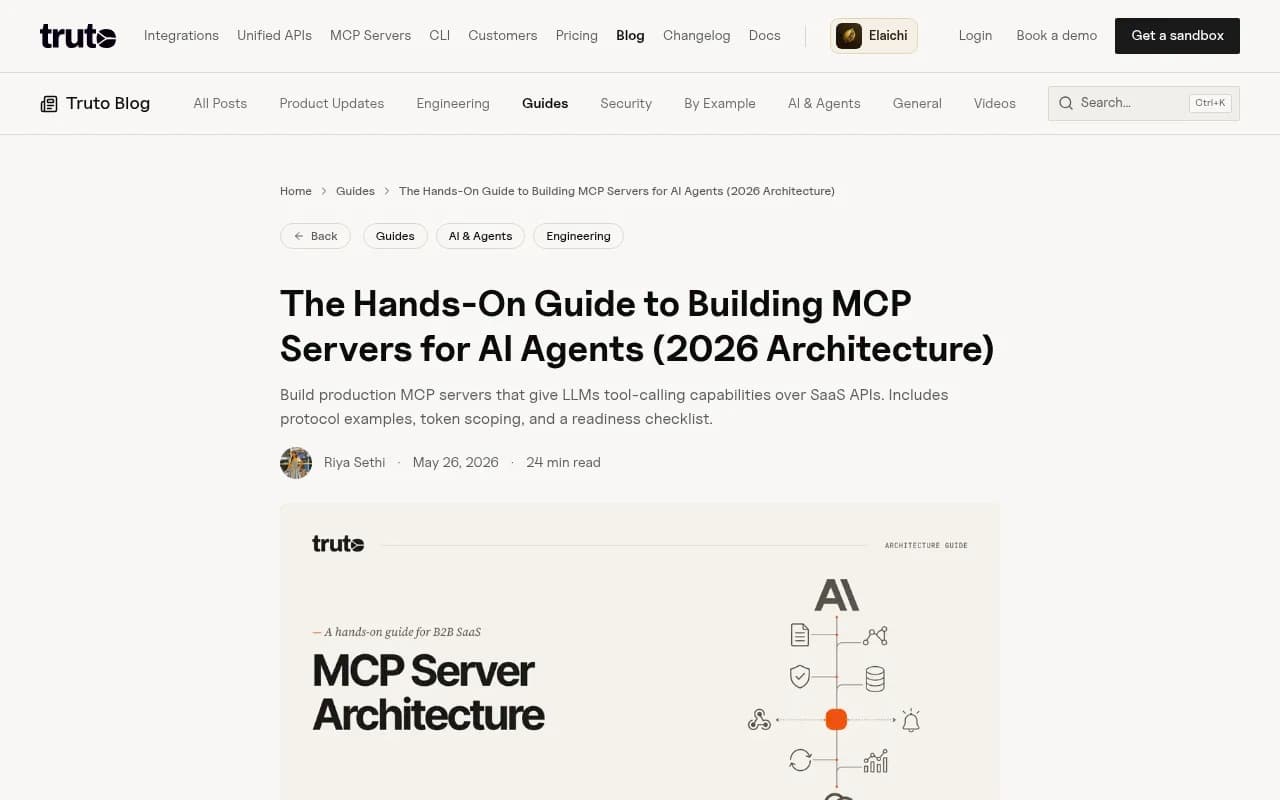
The Truto guide has a sensible list that matches what I would want before letting agents loose on a real API:
| Area | Requirement |
|---|---|
| Token expiry | Set expiry on temporary servers and tokens |
| Errors | Return structured errors with isError: true and the upstream status code |
| Tool count | Keep each server under 20-30 tools, since model accuracy drops with too many |
| Monitoring | Log every tools/call with tool name, tenant, status and latency |
Also publish the endpoint URL on your docs site and in llms.txt. An agent has no other way to find it unless you publish a card.
MCP server cards: where the file goes (it depends)
A server card is a small JSON document that describes your MCP server so clients, IDEs and registries can discover it without opening a connection. Use cases listed in the proposal include IDE autoconfiguration from a domain, registry crawling, and showing metadata before connecting.
What is settled:
- SEP-2127, "MCP Server Cards - HTTP Server Discovery", has status Final.
- Cards are optional and additive. Servers without one keep working.
- If the card and the live
server/discoverresponse disagree, clients should prefer the live values. - Cards describe remote connectivity only. The registry's
server.jsonalso covers locally installable packages.
What is not settled, and what trips people up:
- The final SEP says a card can live at any unreserved URI, with
<streamable-http-url>/server-cardas the recommended location. Domain-level discovery is meant to go through an AI Catalog, such as/.well-known/ai-catalog.json, which links to or embeds cards. - The earlier SEP-1649 used
/.well-known/mcp/server-card.json. A competing proposal put a manifest at/.well-known/mcp. - Many third-party guides, including the Redlinesoft post, tell you to publish
/.well-known/mcp.json. They are not authoritative. - The normative schema and discovery rules live in the
experimental-ext-server-cardrepository, not in the SEP text. Read its discovery doc before you pick a path.
A card shape based on the server.json lineage looks roughly like this (treat it as illustrative and validate against the repo):
{
  "$schema": "https://static.modelcontextprotocol.io/schemas/2025-10-17/server.schema.json",
  "name": "dev.acme/docs",
  "description": "Search and read Acme API documentation",
  "version": "1.0.0",
  "remotes": [
    { "type": "streamable-http", "url": "https://docs.acme.dev/mcp" }
  ]
}
The older shape with serverInfo, transport and capabilities is superseded. If a tutorial uses it, it is out of date. My practical advice: publish the card at the recommended /server-card location, and add the well-known path your target clients actually probe once you have confirmed which that is. It costs a few lines of config either way.
AGENTS.md and SKILL.md: the repo and workflow layer
These two matter if you ship SDKs, CLIs or open source repos, which most dev tools do.
| AGENTS.md | SKILL.md | |
|---|---|---|
| What it is | Markdown at repo root describing how the project works | A folder with instructions for one task |
| Loaded | Every session, in full | Name and description at startup, body only when a task matches |
| Size guidance | Keep it concise; some agents stop at 32 KiB | Body under 5,000 tokens, file under 500 lines |
| Good content | Build commands, conventions, test steps | "Migrate from v2 to v3", "Set up webhooks" |
Start with three to five skills that cover tasks customers already ask agents to do. Migration guides and first-integration walkthroughs are the obvious candidates. Each skill should point back to your markdown docs rather than duplicate them.
What actually drives AI search visibility
If your goal is being recommended when a developer asks ChatGPT "what is the best payments API for marketplaces", the file formats above are not the main event. The citation data points elsewhere:
- For software prompts, GitHub, Microsoft's docs and G2 led ChatGPT citations, and documentation and help centers earned the largest share (Promptwatch Data, September 28 to October 4, 2026). Great docs are an AI search asset, not only an agent asset.
- Product pages were the most cited content type in ChatGPT at 22.4% of citations in the same week (content type report).
- Landing pages and docs stayed cited longest in the 90 days after July 6, 2026, while news lost half its pages within 36 days (content half-life report). Evergreen docs beat launch announcements.
- ChatGPT cited social platforms for just 0.46% of citations while Google AI Overviews got 12.2% (social citations report). Different engines, different source mixes.
So the AI search playbook for a dev tool is: server-rendered docs, clear product and comparison pages, G2 and GitHub presence, and an up-to-date changelog. Then measure what gets cited.
Measuring it
A readiness score from a scanner like isitagentready.com is a decent smoke test, but it only tells you what you published, not what happened. You need two kinds of measurement:
- Are agents reading it? IP-verified crawler logs show which bots fetch which pages and where they hit errors. Spoofed user agents are common, so verification matters.
- Is AI citing it? Prompt and citation tracking shows which of your pages get named in answers, and which competitors get picked instead.
Promptwatch covers both in one place. Its AI crawler logs show what GPTBot, ClaudeBot, PerplexityBot and others read on your site and where they fail, and its prompt tracking shows whether the pages behind that crawling turn into citations. It also tracks coding agents (Codex, Claude Code and OpenCode), which is directly relevant when your buyer is a developer working inside one.

The free Agentic readiness check tests which AI crawlers can read your site and which agent standards you support, including llms.txt, MCP server cards, A2A agent cards, OAuth discovery and Content Signals. It is a quick way to get a baseline before you change anything. If you want to compare other trackers, the GEO software directory at bestgeosoftware.com lists many of them.
A sensible order of operations
Here is the sequence I would run for a dev tool in 2026, in order of return per hour spent:
- Unblock access. Fix robots.txt, WAF and bot challenges on docs. Make sure docs render without JavaScript.
- Fix the content. Working links, last-updated dates, changelog recency, and docs that match your API spec.
- Serve markdown for docs pages and add content negotiation.
- Publish llms.txt generated from your docs build. Keep it hierarchical if the docs are large.
- Turn on a docs MCP server, and publish its URL in docs and llms.txt.
- Publish a server card once the server is stable, and confirm the discovery path against the extension repo.
- Add AGENTS.md to your SDK repos and a handful of skills for your most common tasks.
- Measure monthly: crawler logs, citation share for your category prompts, and AI-referred signups.
Steps 1 and 2 are unglamorous and will do more than steps 4 through 7 combined. Documentation.AI's rubric lists a discoverable MCP server, agent skills, an llms-full.txt file and an AI-admitting robots.txt as signals that improve access but are not yet adopted widely enough to be pass or fail criteria. That matches my experience: nice to have, in that order after the basics.
What to tell your leadership
- Agent readiness is part product, part docs, part marketing. Someone has to own it, and it is rarely the SEO team alone.
- llms.txt will not move AI search citations. Say so up front so nobody is disappointed.
- The real wins come from docs that agents can read and tools they can call, because that decides whether your product makes it into the code an agent writes.
- Re-check your assumptions every quarter. Specs like MCP server cards moved from proposal to Final within months, and discovery paths are still shifting.
If you would rather have a team run the technical SEO and AI search side of this, 1001 SEO Media works on exactly this mix of crawlability, content and generative engine optimization. For tool research beyond AI visibility, the wider directory at surferstack.com is a good starting point.