Key takeaways
- Google does not run a dedicated AI Overviews crawler. AI Overviews and AI Mode draw from the same index Googlebot builds, so if you're hunting for a distinct "AIO bot" user-agent in your logs, you're looking for something that doesn't exist.
- Google-Extended is not a crawler either. It's a robots.txt control token that rides on existing Googlebot and GoogleOther requests. You will never see "Google-Extended" as a user-agent string in a log file.
- Blocking Googlebot to opt out of AI Overviews removes you from classic Search entirely, since both features share the same index. The narrower lever is
nosnippet, and even that kills your regular search snippets too. - Google AI Mode strips the referrer on outbound links (
rel="noreferrer"), so GA4 lumps a chunk of real AI-driven clicks into "Direct" traffic. Your access logs, not your analytics dashboard, are the only place this becomes visible. - Verified AI crawler traffic is shifting away from a single-vendor story: OpenAI's share of verified AI crawler requests fell from 94.8% to 79.8% between early June and early September 2026, according to Promptwatch's AI crawler traffic data, meaning Google, Anthropic, Perplexity and others are all showing up more in server logs than they were a few months ago.
Why there's no such thing as an "AI Overviews crawler"
I get why people go looking for one. Every other AI company seems to have shipped a named bot: GPTBot, ClaudeBot, PerplexityBot. So it's natural to assume Google did the same thing for AI Overviews. It didn't, and understanding why changes how you should read your own logs.
Google's own crawling documentation splits its fetchers into three buckets: common crawlers that always respect robots.txt (Googlebot is the headline example), special-case crawlers used under specific agreements (AdsBot being the classic one), and user-triggered fetchers that act because a person asked for something right now.
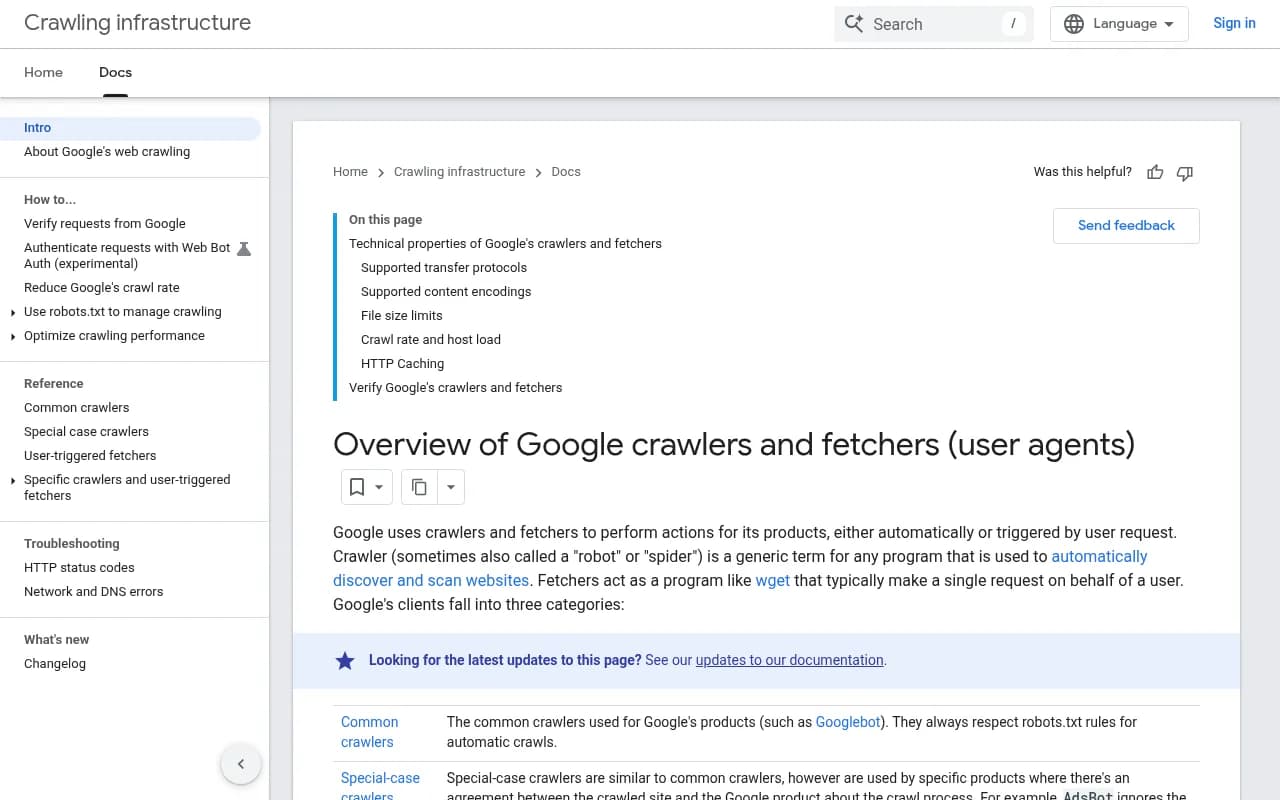
AI Overviews doesn't get its own row in that table. Google's developer documentation on AI features is explicit about this: to be eligible as a supporting link in an AI Overview or AI Mode response, a page just needs to be indexed and eligible to show in classic Search with a snippet. No extra technical requirement, no separate crawl path. The same Googlebot fetches that built your listing in regular search results are what feeds the AI Overview layer sitting on top of it.
This is the single most important thing to internalize before you open a log file. If you're trying to isolate "AI Overview crawl activity" the way you might isolate GPTBot activity, you're solving a problem that doesn't have a log-level answer. The crawl is identical. What differs is how Google's ranking systems use that crawled content once it's indexed.
Google-Extended: the token that never shows up as a visitor
The second source of confusion is Google-Extended, and it's worth being blunt about this because a lot of robots.txt advice gets it wrong. Google-Extended is not a crawler. It's a control token, full stop. It has no IP range, no user-agent string, no entry in your access log that says "Google-Extended was here."
What it actually does: Google crawls your site using the Googlebot or GoogleOther user-agent, same as always. Google-Extended, if you disallow it in robots.txt, tells Google not to use the content it already crawled for training future Gemini models or for grounding (feeding your indexed content into Gemini Apps and Vertex AI at answer time). Google states this directly: Google-Extended does not impact inclusion in Google Search and is not used as a ranking signal.
So when someone tells you "block Google-Extended to keep your content out of AI Overviews," they're wrong on two counts. First, Google-Extended governs Gemini's training and grounding pipeline, not the Search index AI Overviews pulls from. Second, even if it did overlap, you can't "see" its effect in a log because it never generates a request of its own. It's enforced silently on Google's side.
If you actually want out of AI Overviews specifically, the only lever is the nosnippet meta tag or robots directive, and that's a blunt instrument: it removes your snippet from every surface, not just the AI one. Blocking Googlebot outright, which some site owners still try, pulls you out of Google Search altogether, AI Overviews included, because there is no separate index to selectively opt out of.
What actually shows up in your access logs
Here's where it gets more interesting than "it's all just Googlebot." Google runs several distinct crawlers beyond the classic Googlebot, and most of them do leave a trace:
| User-agent you'll see | What it's actually for | Respects robots.txt? |
|---|---|---|
| Googlebot | Core Search indexing, feeds AI Overviews and AI Mode via the shared index | Yes, always on automatic crawls |
| GoogleOther | Generic fetches by various Google product teams, including R&D work | Yes |
| GoogleOther-Image / GoogleOther-Video | Binary content crawling split out from GoogleOther for research purposes | Yes |
| Google-CloudVertexBot | Falls back to the Googlebot token; Vertex-related fetches | Yes |
| AdsBot | Ad quality checks, can ignore the global * rule under publisher agreement | Conditional |
| Google-Agent | A user-triggered fetcher tied to agentic browsing tasks (think "book this hotel") | Generally no |
That last row matters more than it looks. Google-Agent isn't a crawler in the traditional sense, it's what fires when someone delegates a task to an AI agent and that agent needs to load a specific page right now. Google documents it with its own IP range file, separate from the common crawlers list, and it's starting to support cryptographic verification through the emerging Web Bot Auth standard already being tested by Cloudflare, Akamai and AWS. User-triggered fetchers generally ignore robots.txt entirely, because the fetch happens at a user's explicit request rather than as part of an autonomous crawl. That means a CAPTCHA or JS challenge is your only real lever against it, and cranking those up risks blocking a real person who asked an agent to do something on their behalf.
To verify any of these are genuinely Google and not a spoofed user-agent, Google's own documentation recommends a reverse DNS lookup on the requesting IP followed by a forward lookup to confirm it resolves back to the same address. Legitimate Googlebot hostnames follow patterns like crawl-***-***-***-***.googlebot.com. Matching on the user-agent string alone proves nothing, since any client can type whatever string it wants into that header.
The crawl rate wrinkle that catches people off guard
One detail that trips up a lot of site owners doing log analysis: Google sets crawl rate at the host level, not the page level. If one slow subfolder on your site is hard to crawl, Google can throttle the entire hostname in response, including sections that have nothing to do with the slow part. If your logs show Googlebot suddenly backing off across the board, check for a slow or error-prone section elsewhere on the same host before assuming something else broke.
Where AI Overviews actually diverges from classic Googlebot behavior
So if the crawl is the same, what's actually different? Two things, and both only show up if you're looking at logs and Search Console side by side rather than relying on GA4 alone.
First, Google's own Search Central documentation confirms AI Overviews and AI Mode can use a "query fan-out" technique, issuing multiple related searches across subtopics before composing a response. This is a long-established part of how these features retrieve a wider, more diverse set of links than a single classic search would surface. It's worth noting this isn't unique to Google anymore either; ChatGPT only started doing scaled, domain-scoped fan-out queries using the site: operator on August 8, 2026, when its usage jumped from roughly 0.4% to nearly 17% of all fanout queries almost overnight, according to Promptwatch's tracking of ChatGPT's site: operator fanouts. Google had been doing a version of this for longer.
Second, and this is the one that actually costs people measurable traffic they can't see: Google AI Mode adds rel="noreferrer" to every outbound link it generates. That's a deliberate choice, not an oversight, and it strips the referrer header on click-through. The practical effect is that GA4 and most client-side analytics tools classify those clicks as "Direct" traffic, because there's no referrer string to attribute them to AI Mode. If your organic traffic in GA4 has looked flat or slightly down while your Search Console impressions for AI Mode have climbed, this is very likely why. The clicks are happening. Your analytics tool just can't see where they came from, because it was never in the request path to begin with.
Google did partially address the visibility problem on its own side. As of June 3, 2026, Search Console added dedicated Search Generative AI performance reports, giving separate views for AI Overviews and AI Mode with impressions, pages, countries and devices broken out by date. It's a real improvement over the old approach of lumping everything into aggregate web data. The catch: at launch it reports impressions, not clicks or CTR for those surfaces. So you can see that your page showed up in an AI Overview, but you still can't see from Search Console alone whether anyone clicked through. For that, you're back to cross-referencing server logs against whatever partial attribution signals survive the noreferrer stripping.
A quick comparison table
| Signal source | Shows crawl activity? | Shows AI Overview impressions? | Shows AI Overview/Mode clicks? |
|---|---|---|---|
| Server/CDN access logs | Yes, full user-agent and IP detail | No | Partial, via query params on some click-throughs |
| Google Search Console (post-June 2026) | No | Yes, separate AI Overviews/AI Mode filter | No |
| GA4 | No | No | Misattributed as Direct traffic |
Why this matters beyond curiosity
If you're doing crawl analysis purely to figure out "is Google's AI feeding on my content," the honest answer is that it already is, in the exact same way Googlebot has always fed your regular listings, because there's no separate pipeline to isolate. The real value of server-log work in 2026 isn't distinguishing an "AI Overviews bot" from Googlebot, it's reconciling what your logs show against what Search Console's new AI performance reports show, so you can spot the gap between impressions and the clicks your analytics tool is quietly misfiling as direct traffic.
If you're trying to track AI visibility more broadly, not just within Google's ecosystem but across ChatGPT, Perplexity, Claude and the rest, log analysis alone won't get you there, because each of those platforms runs its own crawler with its own purpose split between training, indexing, and live user fetches. Tools like Promptwatch pull this together by combining AI crawler log analysis with citation tracking across every major model, so you're not stitching together Cloudflare Radar screenshots and raw access logs by hand every month.

For a broader view of how AI crawler mix has shifted this year, Promptwatch's crawler traffic data shows OpenAI's share of verified requests dropping from 94.8% in the week of June 8-14, 2026 to 79.8% by early September, as Anthropic, Google, Perplexity and Mistral all picked up share. That's a useful sanity check if your own logs suddenly show a crawler you hadn't seen much of before; it might not be a fluke, it might just be the broader mix changing under you.
Practical steps for your own log review
- Pull Googlebot, GoogleOther, and GoogleOther-Image/Video requests separately, don't lump them. Each represents a distinct crawl purpose even though they share a fallback token.
- Stop looking for "Google-Extended" or any "AI Overviews" string in your logs. You won't find either, because neither generates its own HTTP requests.
- Cross-reference Search Console's new AI Overviews and AI Mode impression filters against your logged sessions to spot the gap left by
rel="noreferrer"stripping. - Verify any suspicious Googlebot traffic with reverse/forward DNS before assuming your crawl volume is legitimate; spoofed user-agent strings are common enough across the broader AI bot ecosystem that it's worth the ten extra seconds per check.
- If a slow subfolder is throttling your whole host's crawl rate, fix that before concluding Google deprioritized you for some AI-related reason.
If you want to go deeper on the wider AI crawler landscape beyond Google specifically, the GEO software directory at bestgeosoftware.com is a reasonable place to compare platforms that track crawler behavior across all the major AI assistants rather than just Google's.