Key takeaways
- ChatGPT started showing ads to Free and Go users in February 2026 and ads now appear in roughly 20-32% of web-search responses, depending on the week, according to Promptwatch Data
- Perplexity killed its ad program in February 2026 and has no plans to bring it back, so "Perplexity ad alerts" in the literal sense don't exist anymore, you need to track mentions and citations instead
- A working alert needs two layers: a controlled prompt portfolio you run on a schedule, and alert logic that flags real changes instead of noise
- OpenAI's Advertiser API is advertiser-side only, there's no official API for watching competitor ads, so monitoring still means UI tracking or a third-party platform
- Tools like Promptwatch, LLM Pulse, and Rank Prompt can automate this, but you can also build a scrappy manual version with a spreadsheet and some discipline
Why this got complicated in 2026
A year ago "competitor ad alerts for AI search" was a hypothetical. Now it's a real workflow problem, mostly because of ChatGPT. OpenAI quietly started testing ads in the US on February 9, 2026, and by the end of August it had crossed a $1 billion annualized run rate in under 200 days. That's an absurd ramp for something that didn't exist eight months earlier.
Perplexity went the opposite direction. It tested sponsored follow-up questions through 2024 and 2025 with partners like Indeed and Whole Foods, paused new advertisers in October 2025, and then told the Financial Times in February 2026 it had no plans to bring ads back at all. Ads had generated only about $20,000 of Perplexity's $34 million in 2024 revenue, so pulling the plug wasn't much of a sacrifice. Perplexity is now chasing roughly $500 million in annualized subscription revenue and marketing itself as the ad-free option.
So if you're building a monitoring setup in late 2026, you're really building two different things: a real ad-tracking system for ChatGPT, and a mention-and-citation watch for Perplexity in case the policy ever flips.
What's actually happening with ChatGPT ads right now
A few operational details matter before you set anything up.
Ads only show to Free and Go plan users. If you're testing from a Plus, Pro, Business, or Enterprise account, you will never see an ad, no matter how good your prompts are. That trips up a lot of people running quick manual checks. You need a logged-out session or a Free-tier account to see what's actually being served.
Ads also don't appear in the Atlas browser during this test phase, and OpenAI explicitly blocks ads near sensitive topics like personal health, mental health, and politics. So if your category touches any of those, don't expect ad data there at all.
According to Promptwatch's daily tracking of ChatGPT Search responses from May through August 2026, ads appeared in zero responses until May 27, then climbed in bursts, jumping past 30% on July 1 and mostly sitting in the low-20s to high-30s since. The 90-day average lands around 20.1%, but the most recent 7-day average (as of mid-August) was 32.4%, up 12.5% week over week. The point: this number moves a lot, and a single day's check tells you almost nothing.
Of the ad-bearing responses, Promptwatch's breakdown shows organic prompts pull the most ad impressions (about 73%), brand-specific prompts about 18%, and competitor-comparison prompts around 8.6%. That last bucket is the one most relevant to this guide, it's smaller than you'd think, which is exactly why you need a deliberate prompt set rather than random spot-checks.
Step 1: build a controlled prompt portfolio
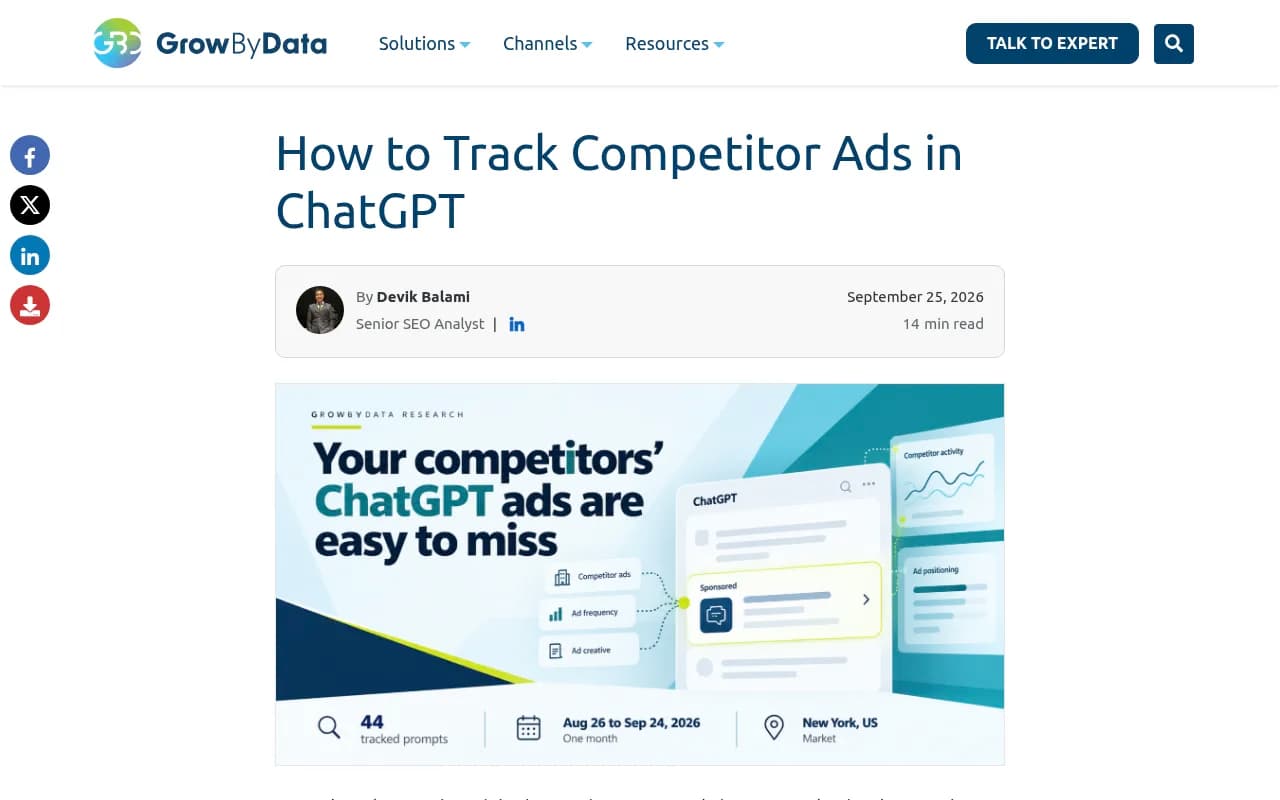
Don't just type random questions into ChatGPT and hope an ad shows up. GrowByData ran a documented experiment: 44 prompts, run roughly once a day for a month, for a B2B SaaS company in the marketing and pricing analytics space. Across 1,317 ChatGPT searches, they saw 66 sponsored placements, about 5%. The same 1,317 prompts run through Google AI Mode produced 129 sponsored placements, nearly double the rate.
That's the model to copy. Build a fixed list of maybe 20-50 prompts covering:
- Category queries: "best [category] for [use case]"
- Direct comparisons: "[your brand] vs [competitor]"
- Switching intent: "alternatives to [competitor]"
- Buyer objection prompts: "is [category] SOC2 compliant", "pricing for [category]"
- Product prompts, if you're in retail, since OpenAI has confirmed product feeds as part of its ad capabilities
Tag each prompt by intent, high, medium, or low. Only high-intent prompts should actually trigger a notification. This matters more than it sounds, because if every prompt pings you, you'll start ignoring the pings within a week.
Step 2: run it on a schedule, not once
Ad serving on ChatGPT isn't static. It moved from roughly 5% in late May to over 40% on some days by mid-summer, and competitor-comparison ad share has swung between 7% and 15% week to week. A single check tells you the weather on one day, not the climate. Run your prompt set daily or every few days, from a logged-out or Free-tier session, in the same locale each time, and log results over at least two to three weeks before you draw any conclusions.
Step 3: design the alert itself, not just the tracking
Tracking without alert logic just produces a spreadsheet nobody reads. The Rank Masters' framework for AI-visibility alerts is a good structure to borrow: a useful alert has to answer what changed, where (which engine, locale, device), on which prompts, by how much, and what to do next. A ping that just says "competitor appeared" without that context gets ignored fast.
At minimum, each alert should capture:
- The prompt text and its intent tag
- Engine and locale
- Whether your brand's ad or mention was present, and how prominent
- Whether a competitor's ad is new or returning, and how prominent
- A snapshot of the answer before and after
- Any citations or sources captured alongside the ad
Also build in a severity threshold. If a competitor shows up once on a low-intent prompt, that's noise. If they show up three days running on your top five high-intent prompts, that's a real shift worth acting on.
Doing this manually vs. using a platform
You can absolutely run this by hand with a spreadsheet, a logged-out browser, and a recurring calendar reminder. It costs nothing but your time, and for a 20-prompt portfolio checked a few times a week, that's maybe 30-45 minutes. It falls apart once you need multiple markets, multiple competitors, or daily cadence, because manual screenshotting doesn't scale and people quietly stop doing it after three weeks.
There's no official API for watching competitor ads on ChatGPT. OpenAI's Advertiser API, documented at developers.openai.com, covers Ad Accounts, Campaigns, Ads, Insights, and Audit Logs, but it's scoped entirely to your own ad account, not anyone else's. So any third-party tool that claims to track competitor ads is doing it through UI monitoring, the same basic approach you'd do by hand, just automated and at scale.
This is where tools like Promptwatch come in. It tracks responses across ChatGPT, Perplexity, Gemini, Claude, AI Overviews, AI Mode, and more using real UI data rather than APIs, which matters because what a user actually sees in the interface, including ad placements and shopping cards, can differ from what an API returns. Its crawler log and citation data also help explain why a competitor is showing up where they are, not just that they are.

For automation specifically around Zapier-style triggers, LLM Pulse has a documented "New Competitor Mention" webhook that fires within seconds and routes into Slack, Google Sheets, or HubSpot. It's a solid pattern if you want alerts delivered where your team already works rather than checked manually.

Other platforms worth a look if you're building out a broader visibility stack include Rank Prompt and Otterly.AI, both of which track prompt-level presence across multiple AI engines at a lower entry price point.
Rank Prompt

Comparing the options
| Approach | Cost | Covers ChatGPT ads | Covers Perplexity | Alert automation | Best for |
|---|---|---|---|---|---|
| Manual spreadsheet | Free (your time) | Yes, with effort | Mention tracking only | None, manual checks | Solo marketers, small prompt sets |
| Promptwatch | From $95/mo | Yes, real UI monitoring | Yes, citation and mention tracking | Agent Chat, Unified Actions, weekly digest | Teams wanting tracking plus content fixes |
| LLM Pulse | From €49/mo | Partial, mention-focused | Yes, mention tracking | Zapier webhooks (Scale plan+) | Teams already in Slack/Zapier workflows |
| Rank Prompt | Lower-cost tier | Partial | Yes | Basic | Budget-conscious tracking |
What to do about Perplexity specifically
Stop looking for Perplexity ad alerts. They don't exist right now, and the company has said publicly it doesn't plan to bring them back, citing user trust concerns. So redirect that effort into two things instead.
First, track competitor brand mentions and citations inside Perplexity answers. This isn't a paid placement, but it's the closest analog to "did my competitor show up where my customers are looking," and it's arguably more useful long-term since Perplexity's whole pitch is that its answers are earned, not bought.
Second, set a watch for any policy reversal. A simple Google Alert for "Perplexity advertising" or "Perplexity self-serve ads" will catch it if Perplexity changes course, which, given how fast ChatGPT's ad program scaled, isn't impossible. Just don't build a monitoring system around a feature that doesn't exist yet.
A realistic weekly workflow
Here's roughly what this looks like once it's running:
- Monday: run your 20-50 prompt portfolio from a logged-out or Free-tier ChatGPT session, plus the same set in Perplexity for mention tracking
- Log results: which prompts showed ads, which advertiser, which landing page, whether a competitor showed up as a citation in Perplexity
- Compare against the prior week, flag anything that crosses your severity threshold, a new advertiser on a high-intent prompt, a competitor appearing three days running
- If something's flagged, dig into why, check if they launched a new campaign, changed pricing, or published new comparison content that's getting cited
- Act on it: adjust your own bidding if you're running ChatGPT ads yourself, or brief your content team on a response page if it's an organic citation issue
If you're doing this across more than one or two markets or competitors, that workflow gets tedious fast by hand, and that's the point where a dedicated platform earns its subscription cost.
A note on scale
If you want more data points before deciding how much to invest in monitoring, Promptwatch's ongoing ad-frequency tracking is worth bookmarking, it updates the ChatGPT ad rate numbers regularly rather than freezing a single snapshot. You can also browse the broader category of AI visibility platforms at the GEO software directory on bestgeosoftware.com if you want to compare more options side by side before committing to one.
The core lesson for 2026 is pretty simple: ChatGPT ad monitoring is real work now and worth doing properly, with a fixed prompt set, a schedule, and alert thresholds that filter out noise. Perplexity monitoring is a different job entirely, mention tracking dressed up as ad tracking, and treating it any other way just wastes effort chasing a feature that isn't there.