Key takeaways
- Claude Code fetches docs to finish a task. It isn't browsing for inspiration, so your docs need to answer a concrete implementation question fast.
- Plain HTML pages with clean headings are still what AI search cites (99.94% of citations in Promptwatch's data), but developer docs are the one place where .md endpoints and an llms.txt index make sense.
- Write down what an agent can't see by reading your code: decisions, gotchas, required environment variables, non-obvious defaults.
- Make sure Claude-User and ClaudeBot aren't blocked by robots.txt or your CDN/WAF, then check your server logs monthly.
- Measure the result. Crawler logs and citation tracking tell you whether the problem is access or content.
How Claude Code actually uses documentation
Most advice on getting cited was written for ChatGPT-style search: a person asks a question, the model runs a handful of web searches, and it cites some pages. Claude Code works differently, and that changes what good documentation looks like.
Claude Code is an agentic coding tool. It has a task (add Stripe webhooks, migrate to a new SDK version, set up auth), and it pulls in whatever context it needs to finish. That means reading your repo, reading project files like CLAUDE.md, and sometimes fetching external docs, READMEs and API references. Promptwatch's markdown report describes a "huge uptick" in docs and site information being crawled by Claude's bot and OpenAI's bot, and the crawler log table shows /docs/**/*.md paths requested most. The caveat is that the table's paths are masked and no date range is given, so treat it as a direction, not a precise measurement.
Two things follow from this.
- The reader is on a deadline. An agent wants the exact method signature, the required parameter, the error code and the working example. It doesn't want your origin story.
- The reader has limited context. Every irrelevant paragraph costs tokens and pushes useful material out of the window. Concise pages win.
One honest limit: I could not verify how Claude Code's web fetch and search tools pick and rank sources. Nobody outside Anthropic can say for certain, so the practical approach is to remove every obstacle you can control (access, format, clarity) and then measure.
Step 1: Let the agent in
The most boring step is also the one that fails most often. If Claude's crawlers can't reach your docs, nothing else matters.
Promptwatch's Claude citation crawler data (Dec 10, 2025 to Apr 18, 2026, 7-day rolling average) shows the Claude-User agent growing from about 30 visits a day in mid-December 2025 to several thousand a day by mid-April 2026, more than 100x. Claude's share of tracked AI citation crawler traffic is still small (0.45% overall across the 130 days, 1.09% on the latest day), because ChatGPT dominates the rest. It's a fast-growing secondary channel, not the main one yet. Worth caring about, not worth panicking over.
Checklist:
- Check robots.txt for rules that block ClaudeBot, Claude-User or Claude-SearchBot, including broad
User-agent: *disallows on/docs/. - Check CDN and WAF bot rules. Cloudflare and similar tools often block unknown automated traffic by default.
- Check that docs render without heavy client-side JavaScript. Promptwatch's advice is to fix that first, because a page the retrieval system can't parse loses citations.
- Skip login walls and cookie interstitials on public docs.
If you want to see what is hitting your pages, Promptwatch's AI crawler logs show IP-verified visits from Claude and other bots, which pages they read and which errors they hit. Its free robots.txt generator for AI and the AI bots directory help you write rules that allow the right agents.
Step 2: Choose formats deliberately
This is where people get confused, so let me be direct. Markdown is not a magic ranking trick.
In Promptwatch's data, HTML makes up 99.94% of AI search citations, markdown 0.05% and images 0.015%. That is roughly 2,000 to 1 in favor of HTML. The conclusion Promptwatch draws: don't build .md mirrors of marketing or blog pages to win AI search visibility. Put the effort into HTML pages with clear heading hierarchy, semantic markup and content that answers a question directly.
The exception is developer documentation. Coding agents fetch docs directly, and markdown is simpler, costs less parsing time and keeps the context window clean. So the rule of thumb is:
| Content type | Best format | Why |
|---|---|---|
| Marketing and blog pages | Clean HTML, semantic headings | AI search citations are almost entirely HTML |
| Product and landing pages | Clean HTML | Product pages are the most cited type in ChatGPT (22.4%, Sep 28 to Oct 4, 2026) |
| API reference and developer docs | HTML plus .md endpoints | Coding agents fetch specific docs and prefer light markup |
| Agent index of all docs | llms.txt | Lets an agent discover every page in one fetch |
The Claude Code docs themselves are a useful pattern to copy. Every page advertises an index at code.claude.com/docs/llms.txt and tells agents to fetch the complete documentation index there to discover all pages. You can generate your own with the free LLMs.txt generator.
# Acme SDK

> Acme SDK for Node.js. Payments, webhooks and subscriptions.

## Docs
- [Quickstart](https://acme.dev/docs/quickstart.md): Install and send your first payment
- [Webhooks](https://acme.dev/docs/webhooks.md): Verify signatures and handle retries
- [Errors](https://acme.dev/docs/errors.md): Every error code and its fix
I would not claim llms.txt guarantees citations. The evidence I have shows agents requesting docs paths, not that a specific index file is read by any given model. It's cheap to publish and consistent with how agents work, which is reason enough.
Step 3: Document what the agent can't see
The best guidance here comes from Anthropic's own docs. The current Claude Code best practices say to write down only what Claude can't find by reading the repo, or what it would otherwise spend time rediscovering every session. Examples: team decisions, a deploy process that lives in one person's head, the environment variable integration tests need.
There is a simple two-question test before writing anything down: could it find this by reading the code, and would it actually go and look? If both answers are yes, leave it out.
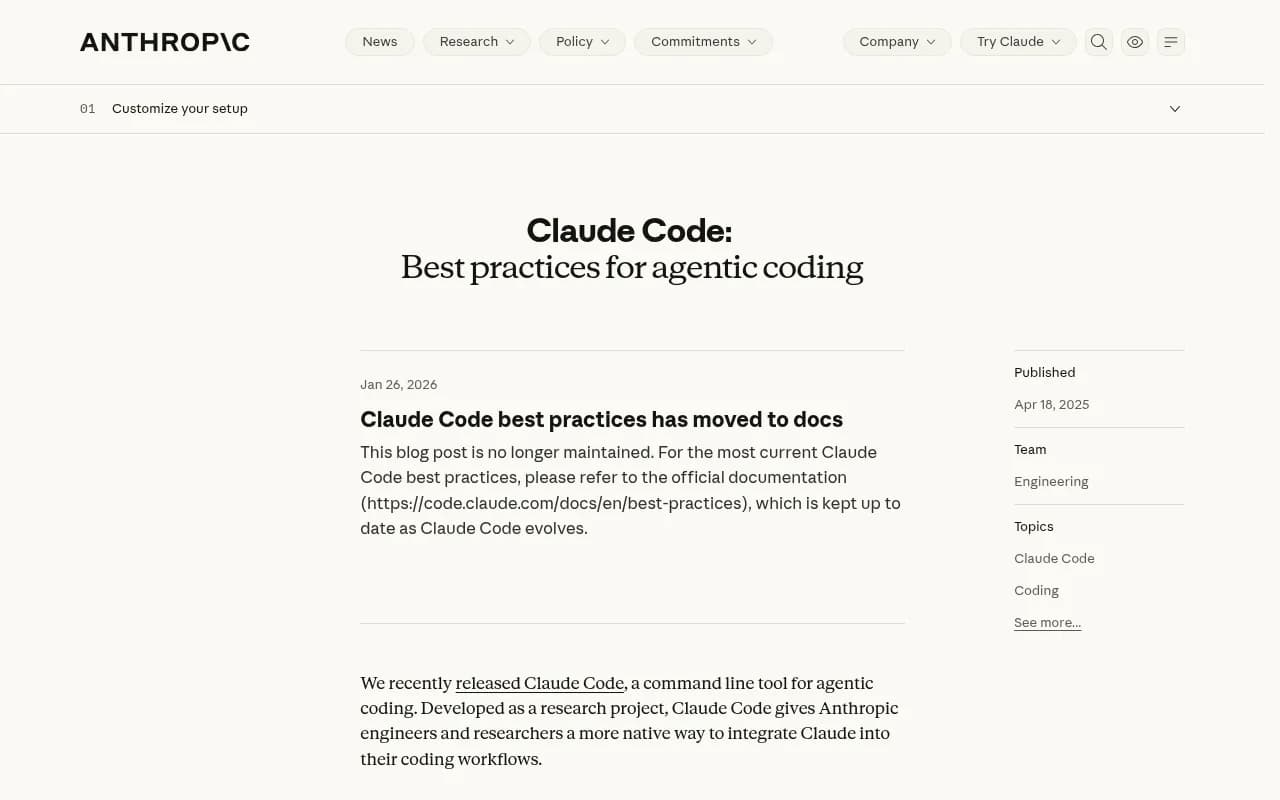
Note the banner on the older Anthropic post: it is marked no longer maintained and points to the docs. That's a lesson in itself. Stale docs are worse than none, because an agent will follow them confidently.
Applied to a public docs site, that means:
- Don't restate function signatures in prose when a generated reference exists. Link to it.
- Do document the traps. "The webhook secret differs between test and live mode." "Pagination caps at 100 even if you request more."
- Do document decisions and defaults. Which option is recommended, and why.
- Do state version boundaries. Agents get confused by docs that mix v2 and v3 behavior.
Step 4: Write pages an agent can use in one fetch
An agent fetching a page is trying to complete a task. Structure each page around one.
Lead with the answer
Put the working example in the first screen. Explanation comes after. Compare these two openings:
- Weak: "Webhooks are a powerful way to receive real-time notifications about events in your account."
- Strong: "Verify webhook signatures with
acme.webhooks.verify(body, header, secret). Reject any request that throws."
Use a predictable heading hierarchy
One H1, then H2s for tasks, H3s for variants. Headings should read like the questions developers ask: "Retry failed webhooks", "Rotate an API key". Promptwatch's advice for HTML pages is the same: clear heading hierarchy, semantic markup, content that answers a question directly.
Give complete, copy-pasteable code
Include imports, install commands and the environment variables the snippet needs. Snippets that omit setup force the agent to guess, and guesses become wrong recommendations.
Be specific about errors
The Claude Code docs advise that good prompts name the file, describe the symptom and say what "fixed" looks like. Mirror that in your troubleshooting pages: exact error message as the heading, cause, fix, and how to confirm it worked.
Keep pages small and single-purpose
A 6,000-word page covering everything wastes context. Several focused pages, linked from an index, work better for a tool that reads selectively.
Step 5: Help project-level docs too
If your goal is for Claude Code to recommend your tool, remember that much of its context comes from the user's own repo. A CLAUDE.md file is pulled into context at the start of a session, and Anthropic's guidance is to keep it concise and human-readable with no required format. Typical contents are common commands, core files, code style, testing instructions, repo etiquette, environment setup and project warnings.
For library and tool authors, that suggests something practical: ship a short, copyable snippet in your docs that users can drop into their CLAUDE.md.
# Acme SDK
- Install: npm install @acme/sdk
- Always verify webhook signatures with acme.webhooks.verify before parsing the body
- Use test keys (sk_test_) in CI. Live keys are never available in CI.
- Docs index for agents: https://acme.dev/docs/llms.txt
One more point from the official docs worth knowing. Instructions in CLAUDE.md, prompts and skills are non-deterministic: Claude decides whether to follow them. Hooks, deny rules and managed settings are deterministic. If a rule matters, such as never committing secrets, it belongs in a hook, not in a louder paragraph of docs. Don't expect any documentation to enforce behavior.
A community tip from the r/ClaudeCode thread on maintaining docs is to let Claude Code generate the skeleton from the source, because it catches routes you forgot existed. That's a user report, not an official recommendation, but it works as a drift check: have an agent compare your docs to your code and list endpoints with no page.
Step 6: Build the surrounding signals
Claude Code isn't the only place your tool gets recommended, and the sources it and other models pull from overlap. Promptwatch's software citation report for ChatGPT (Sep 28 to Oct 4, 2026) is the closest first-party proxy I have for docs citations. It covers ChatGPT, not Claude, so read it as a pattern rather than a Claude measurement.
| Source type | Share of software citations |
|---|---|
| Docs and help centers | 2.64% |
| Vendor sites | 2.01% |
| Review sites and analysts | 1.57% |
| GitHub | 1.2% |
| App stores | 0.47% |
Vendor sites plus docs earn 4.65%, about 3x review sites and analysts. The takeaways Promptwatch draws are straightforward: publish crawlable docs and help pages, keep a public GitHub presence, and keep G2 and Capterra profiles current. The top domains were github.com (1.2%), learn.microsoft.com (0.98%) and g2.com (0.73%). Those percentages are shares of all software citations, so small numbers are normal.
Translated into actions:
- Keep your README short, accurate and aligned with the docs. Agents fetch READMEs.
- Keep examples in a public repo with working code.
- Keep third-party profiles consistent with your docs, since the same facts get repeated across sources.
- Retire or redirect outdated pages. Promptwatch's content half-life data found that docs and landing pages stay cited longest in ChatGPT, while news loses half its pages within 36 days, so evergreen docs reward maintenance.
Step 7: Measure whether it worked
Publishing and hoping is how most docs work gets wasted. You need two kinds of evidence: did agents read the page, and did anything recommend you.
- Crawler access. Baseline Anthropic user agents (ClaudeBot, Claude-User) in your server logs and review them monthly, as Promptwatch's guidance suggests.
- Citation and mention tracking. Run the prompts developers would actually ask, such as "best library for X" and "how do I do Y with Z", and record whether you appear and which pages are cited.
- Traffic. Check AI-referred visits and which docs pages they land on.
Promptwatch covers all three in one place: IP-verified crawler logs, tracking across ChatGPT, Claude, Gemini, Perplexity and the coding agents Codex, Claude Code and OpenCode, and visitor analytics for AI-referred traffic. Its content gap analysis points to prompts where competitors get cited and your docs don't, and a crawl-to-citation view helps separate an access problem from a content problem.

If you want to compare options, the directory at bestgeosoftware.com lists GEO platforms, and tools like [tool:profound] and [tool:peec-ai] sit in the monitoring-focused part of the market. Check how each handles coding agents and crawler logs before you choose, since many trackers only cover chat assistants.
Common mistakes
- Blocking AI crawlers site-wide and then wondering why nothing is cited.
- Publishing .md mirrors of marketing pages. The data says HTML wins there.
- Writing docs that restate the code. The official advice is the opposite: capture what the agent can't see.
- Letting versions blur together. State which version each page covers.
- Treating
CLAUDE.md-style guidance as enforcement. Critical rules need hooks. - Leaving stale pages live. Agents won't know they're stale.
A quick implementation plan
- Audit robots.txt and CDN rules for Claude's user agents. Fix blocks.
- Confirm docs render server-side as plain HTML.
- Publish an llms.txt index and .md versions of developer docs only.
- Rewrite the top 10 pages to lead with a working example and add the gotchas an agent can't infer.
- Add a copyable
CLAUDE.mdsnippet to your quickstart. - Review crawler logs and tracked prompts monthly, then refresh pages that get fetched but never cited.
The pattern is consistent. Make docs reachable, small, specific and current, then check the logs. That's less glamorous than a trick, and it's the part that holds up as Claude Code's behavior changes.